Choose how you generate.
Your APIs · Jimeng · Local ComfyUI
Configure text, images and video separately. Add local models when you need them.
Your Windows AI filmmaking workspace
Turn an idea into a story, and a storyboard into moving images Write, generate, enhance and export in one project
Windows x64

Beyond the mist
An unknown horizon

After the last train
Concept artwork for creative inspiration, not verified outputs from the app.
FROM AN IDEA TO A FILM
Develop the story, confirm the character and shots, then generate, enhance and assemble your media. Start small and review each stage before expanding.
INSIDE LINGJINGMOVIE
Keep the story, characters, shots and media together. Create AI shorts, animated stories, or a first three-shot exercise in your Windows workspace.
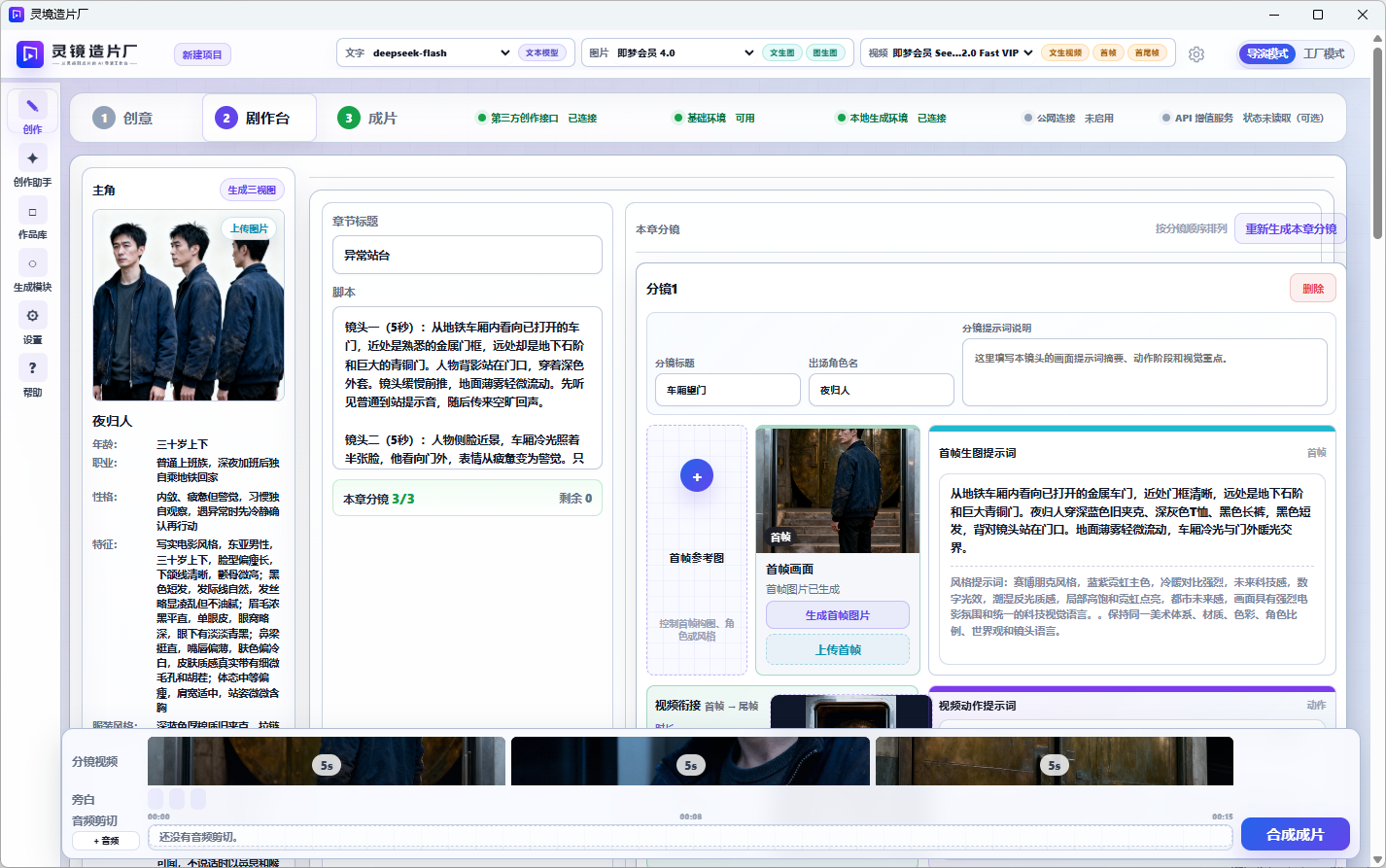 View full screen
Your APIs · Jimeng · Local ComfyUI
Configure text, images and video separately. Add local models when you need them.AI upscaling · Frame interpolation · Batch processing
Enhance selected media in the creative assistant, or upscale the final video at export.Video assembly · Premiere Pro / Jianying export
Save the project and media together, then continue editing in the software you use.TWO MODES. YOUR PACE.
Review each stage in Director mode, or set review checkpoints in Factory mode.
Review the script, characters and shots before moving on to generation and assembly. Refine the stages that need your attention.
Choose your story, style and review checkpoints. The workflow advances through the steps you set, with options to pause and adjust models.
BEFORE THE FIRST TAKE
A little clarity, so you can focus on creating.
Read all 12 questionsYes. If you use your own third-party APIs, an NVIDIA GPU is not required, and you do not need the full local generation environment. For local generation or enhancement, check the hardware requirements of the selected models and workflows.
Open the license panel in the app, copy your machine code, obtain an SN on the activation page, then paste it into the app. App licenses are currently free to obtain; third-party model and membership fees are separate.
Open supporter activationYes. Export a .prproj project, open it in Premiere Pro, or use Jianying’s “Import PR or FCP project” option. Keep the exported media in its saved location; moving it or changing computers may require relinking the files.
The download buttons take you to the official GitHub project, where you can find the Windows installer and instructions. Download the .exe installer, rather than GitHub’s automatically generated source-code archive. For help, open an issue with your version and the steps to reproduce the problem.
Visit GitHub Issues
YOUR STORY DESERVES A FIRST FRAME
Windows x64
App licenses are currently available free of charge. Third-party model usage and subscription fees are separate.